Download the Eastel Super App – Free for Android, iOS, Windows & macOS
Why Download the Eastel Super App?
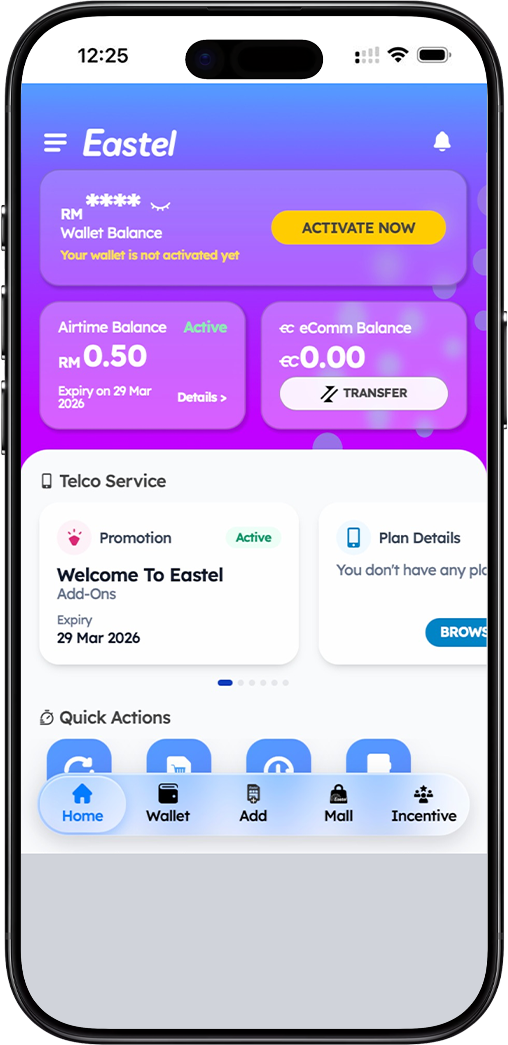
Everything You Need in One Place
The Eastel Super App is your all-in-one platform to manage your Eastel SIM card, monitor your data usage, top up your account, and access exclusive Eastel services — anytime, anywhere.
Free to Download, Easy to Use
The Eastel Super App is completely free to download across all supported platforms. With a simple and intuitive interface, getting started takes just a few taps or clicks.
Secure & Always Up to Date
Your Eastel account is protected with identity-based login and a 6-digit PIN. Regular app updates ensure you always have access to the latest features and security improvements.
Download the Eastel Super App on Android
Step 1 – Visit the Eastel Download Page
On your Android device, open this download page and tap the "Download for Android" button. You will be redirected to the download landing page where the Android option is available.
Step 2 – Select the Android Download Option
On the download landing page, tap the Android download option. You will be directed to the Google Play Store to download the Eastel Super App onto your Android device.
Step 3 – Install & Open the App
Tap "Install" on the Google Play Store page. Once installed, open the Eastel Super App, log in with your User ID and 6-digit PIN, and start managing your Eastel account.
Download the Eastel Super App on iOS
Step 1 – Visit the Eastel Download Page
On your iPhone or iPad, open this download page and tap the "Download for iOS" button. You will be redirected to the download landing page where the iOS option is available.
Step 2 – Select the iOS Download Option
On the download landing page, tap the iOS download option. You will be taken to the Apple App Store where you can download the Eastel Super App for free.
Step 3 – Install & Open the App
Tap "Get" on the App Store page to begin the installation. Once installed, open the Eastel Super App on your iPhone or iPad and log in to access all your Eastel account features.
Download the Eastel Super App on Windows
Step 1 – Visit the Eastel Download Page on Your PC
On your Windows PC, open this download page and click the "Download for Windows" button. You will be redirected to the download landing page where the Windows download option is listed.
Step 2 – Select the Windows Download Option
On the download landing page, click the Windows option to begin downloading the Eastel Super App installer file directly to your PC.
Step 3 – Install & Launch the App
Open the downloaded installer file and follow the on-screen instructions to complete the installation. Once installed, launch the Eastel Super App on your Windows PC and log in to your account.
Download the Eastel Super App on macOS
Step 1 – Visit the Eastel Download Page on Your Mac
On your Mac, open this download page and click the "Download for macOS" button. You will be redirected to the download landing page where the macOS download option is available.
Step 2 – Select the macOS Download Option
On the download landing page, click the macOS option to download the Eastel Super App installation file directly to your Mac device.
Step 3 – Install & Launch the App
Open the downloaded file and drag the Eastel Super App into your Applications folder to complete the installation. Launch the app, log in with your credentials, and enjoy full access to your Eastel account.
Frequently Asked Questions About the Eastel App Download
Is the Eastel Super App free to download?
Yes, the Eastel Super App is completely free to download on Android, iOS, Windows, and macOS. Standard data charges from your mobile or internet plan may apply when using the app.
What devices support the Eastel Super App?
The Eastel Super App supports Android smartphones, iPhones, iPads, Windows PCs, and Mac computers. Make sure your device meets the minimum OS requirements for a smooth experience.
Do I need an Eastel SIM card to use the app?
Yes, the Eastel Super App is designed for Eastel SIM card users. If you do not yet have an Eastel SIM card, you can register and activate one directly through the app after downloading.
How do I update the Eastel Super App?
For Android and iOS, updates are available through the Google Play Store and Apple App Store respectively. For Windows and macOS, check the download page periodically for the latest version of the app.
Get the Eastel Super App Today – Free Download
Download the Eastel Super App on your preferred device and take full control of your Eastel account. Manage your SIM, top up, track usage, and more — all from one powerful app.
