Login to Your Eastel Account – Manage Everything in One App
Access Your Eastel Super App Account Anytime, Anywhere
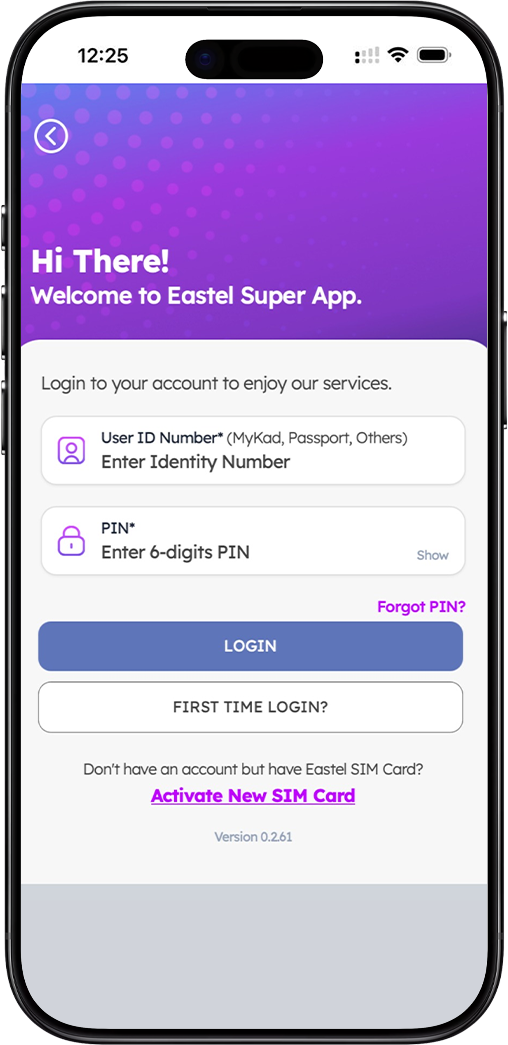
One App, Full Control
The Eastel Super App gives you complete access to your account — check your data balance, manage your SIM, top up, and more. Everything you need is just a login away.
Secure Login with Your Identity Number & PIN
Your Eastel account is protected with your User ID Number (MyKad, Passport, or others) and a 6-digit PIN, keeping your account safe and accessible only to you.
Available on Android & iOS
Download the Eastel Super App on your Android or iOS device and log in instantly. A stable internet connection is all you need to get started.
How to Login to Your Eastel Account – Step-by-Step Guide
Step 1 – Download the Eastel Super App
Before logging in, download the Eastel Super App from the Google Play Store or Apple App Store. The app is free to download and available for all Eastel users.
Step 2 – Open the App and Enter Your User ID Number
Launch the Eastel Super App on your device. On the login screen, enter your User ID Number — this can be your MyKad number, passport number, or other accepted identification number.
Step 3 – Enter Your 6-Digit PIN
Key in your 6-digit PIN to authenticate your login. Tap "Show" if you need to verify what you have entered. Your PIN keeps your Eastel account secure at all times.
Step 4 – Tap "Login" to Access Your Account
Once your User ID Number and PIN are entered correctly, tap the "LOGIN" button to access your Eastel account dashboard and enjoy all available services.
First Time Logging In to Eastel?
Set Up Your Account on First Login
If this is your first time accessing the Eastel Super App, tap the "First Time Login?" button on the login screen. You will be guided through a quick setup process to activate your account access.
Already Have an Eastel SIM Card But No Account Yet?
If you have an Eastel SIM card but have not yet created an account, tap "Activate New SIM Card" on the login page to begin your registration and get your account set up.
Forgot Your Eastel PIN? Here's What to Do
Reset Your PIN via OTP
If you have forgotten your 6-digit PIN, tap "Forgot PIN?" on the Eastel login screen. Enter your Eastel mobile number and an OTP will be sent to you to reset and set a new PIN securely.
Frequently Asked Questions About Eastel Login
What do I use as my User ID to log in to Eastel?
Your User ID is your identity document number — this includes your MyKad number, passport number, or any other accepted government-issued identification number registered with your Eastel account.
What if I enter the wrong PIN too many times?
For your account security, repeated incorrect PIN attempts may temporarily lock your access. Use the "Forgot PIN?" option to reset your PIN via OTP sent to your registered Eastel mobile number.
Do I need an internet connection to log in?
Yes. A stable internet or Wi-Fi connection is required to log in to the Eastel Super App and access your account features.
Is the Eastel Super App free to download?
Yes, the Eastel Super App is completely free to download from the Google Play Store and Apple App Store. Standard data charges from your mobile plan may apply when using the app.
Ready to Log In to Your Eastel Account?
Download the Eastel Super App today and log in to manage your SIM card, check your balance, and access all Eastel services — anytime, from anywhere.
