Eastel Top Up – Reload Your Airtime Credit Fast & Securely
Top Up Your Eastel Number Anytime with Multiple Payment Options
Instant Airtime Credit Reload
With the Eastel Super App, topping up your airtime credit is quick and hassle-free. Your credit is updated instantly so you can stay connected without any interruption to your service.
Flexible Reload Amounts
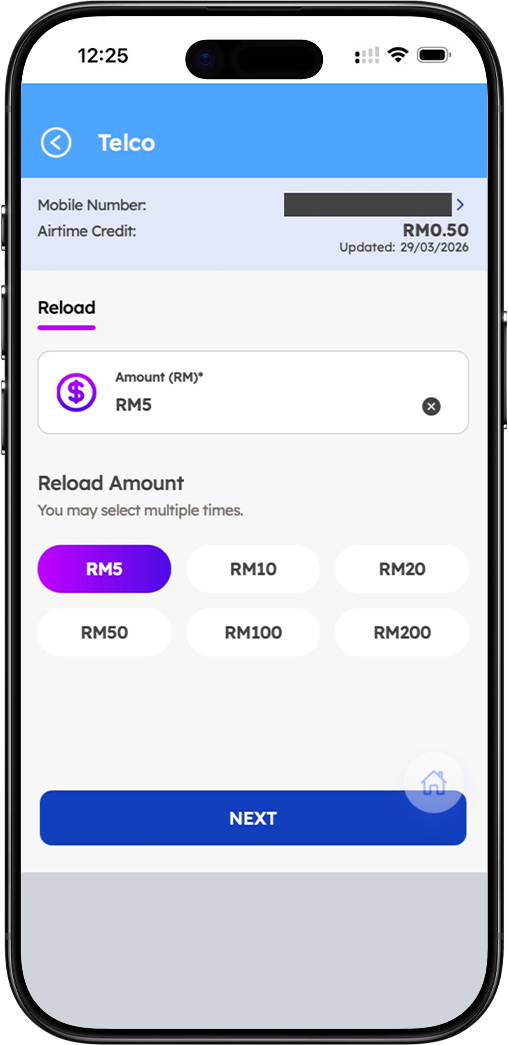
Choose the reload amount that suits your needs. Eastel top up starts from a minimum of RM5, with available preset amounts of RM5, RM10, RM20, RM50, RM100, and RM200. You may also select multiple amounts in a single session.
Reload for Yourself or Someone Else
The Eastel Super App lets you reload your own registered numbers or top up airtime credit for any other Eastel number — making it easy to help family and friends stay connected.
How to Top Up Your Eastel Airtime Credit – Step-by-Step Guide
Step 1 – Open the Eastel Super App and Go to Top Up
Launch the Eastel Super App on your device and navigate to the Telco section. Your registered mobile number and current airtime credit balance will be displayed on the screen.
Step 2 – Select or Enter Your Mobile Number
Your current registered Eastel number will appear by default. To reload a different number, tap the arrow next to your mobile number to open the number selection screen. From there, choose from your saved numbers or select "Reload for Other Numbers" and manually enter the recipient's mobile number.
Step 3 – Choose Your Reload Amount
Under the Reload Amount section, select your preferred top up amount from the preset options: RM5, RM10, RM20, RM50, RM100, or RM200. You may select multiple amounts to reach your desired total. The minimum reload amount per transaction is RM5.
Step 4 – Tap "Next" to Proceed to Payment
Once you have selected your reload amount and confirmed the mobile number, tap the "Next" button to proceed to the payment screen where you can review your order summary and choose your preferred payment method.
Step 5 – Choose Your Payment Method
On the payment screen, select how you would like to pay for your Eastel top up. Available payment methods include Eastel Wallet, Debit or Credit Card, Online Banking via FPX, and Other E-wallets. Ensure your chosen payment method has sufficient balance before proceeding.
Step 6 – Confirm and Complete Your Top Up
Review your order summary, including the total amount and any applicable discounts. Once everything looks correct, tap "Proceed Pay" to complete your Eastel airtime top up. Your credit will be updated instantly upon successful payment.
Eastel Top Up Payment Methods
Eastel Wallet
Use your Eastel Wallet balance for a seamless one-tap top up experience. If your wallet balance is insufficient, you can reload your Eastel Wallet directly from the payment screen before proceeding.
Debit or Credit Card
Pay for your Eastel top up using any Visa or Mastercard debit or credit card. Your card details are processed securely to protect your financial information at all times.
Online Banking via FPX
Top up your Eastel airtime credit using online banking through FPX. This option supports most major Malaysian banks, making it a convenient choice for users who prefer direct bank transfers.
Other E-Wallets
Eastel also supports payment via other popular e-wallets available in Malaysia. Select the e-wallet option at checkout and complete your top up through your preferred digital wallet provider.
Frequently Asked Questions About Eastel Top Up
What is the minimum top up amount for Eastel?
The minimum reload amount for an Eastel top up is RM5 per transaction. You can select multiple preset amounts in a single session to reach your desired credit total.
Can I top up an Eastel number that is not mine?
Yes. The Eastel Super App allows you to top up airtime credit for any Eastel number — not just your own. Simply select "Reload for Other Numbers" and enter the recipient's mobile number to proceed.
How long does it take for my Eastel top up to be credited?
Your Eastel airtime credit is updated instantly after a successful payment. You can check your updated balance on the Telco screen within the Eastel Super App right after the transaction.
What should I do if my Eastel Wallet balance is insufficient?
If your Eastel Wallet does not have enough balance to cover your top up, you will see a prompt to reload your wallet. Tap the "Reload Wallet" button on the payment screen to add credit to your Eastel Wallet before completing the transaction.
Is it safe to top up using a debit or credit card on Eastel?
Yes. All payment transactions on the Eastel Super App are processed through secure and encrypted payment gateways, ensuring your card and banking details are fully protected.
Keep Your Eastel Number Connected – Top Up Now
Running low on airtime credit? Top up your Eastel number instantly through the Eastel Super App. Choose your amount, pick your payment method, and get credited in seconds — anytime, anywhere.
